- Trang chủ /
- Điện tử /
- Máy ảnh /
- Camera Accessories /
- Camera Lens & Accessories /
- Lens Caps /
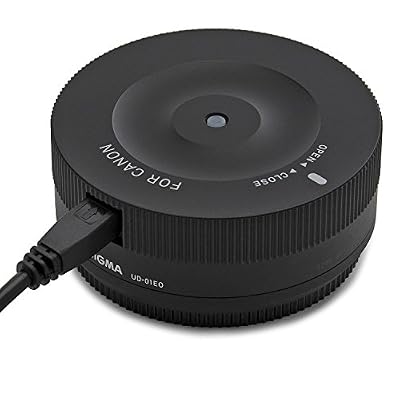
- Sigma USB Dock for Canon
0 ratings


Sản phẩm #:
1326988
Sigma USB Dock for Canon
Sản phẩm #:
1326988
VND 1716120
Price Details
Excluding Shipping & Custom charges ( Shipping and custom charges will be calculated on checkout )
*All items will import from Hoa Kỳ
0 ratings
Viết đánh giá
Trong kho
 Đã nhập từ cửa hàng USA
Đặt hàng ngay bây giờ và nhận hàng vào khoảng Thứ Sáu, Tháng 7 03
Secured transaction
Ubuy works hard to protect your security and privacy. Our advanced payment security system ensures confidentiality by encrypting your information during transmission using AES (Advanced Encryption Standards) and SSL (Secure Socket Layer) protocols. Your payment details are 100% secure as we do not share your payment details with third party sellers.
Our Top Logistics Partners


Customize autofocus, OS and focus with SIGMA Optimization Pro software for Global Vision Lenses

Fast
Shipping

Free
Return*

Secure Packaging

100% Original Products

PCI DSS Compliance

ISO 27001 Certified


Note: Step Down Voltage Transformer required for using electronics products of Hoa Kỳ store (110-120). Recommended power converters Mua ngay.


What Stands Out
All-in-One Solution
The Sigma USB Dock offers a streamlined method to update firmware and adjust parameters for Canon lenses, addressing the need for convenient lens management without additional equipment.
Customization Options
With customizable settings such as focus adjustments and lens corrections, users can tailor their lens performance to specific needs, ensuring optimal results for every photography session.
User-Friendly Interface
Designed with an intuitive layout, the Sigma USB Dock simplifies the process of lens configuration for all users, even those with minimal technical expertise, enhancing overall user satisfaction.
Thông tin chi tiết sản phẩm
| Package Weight | 1 Pound |
Who Should Buy?

-
Professional Photographers
Allows fine-tuning of lens settings, improving performance for critical tasks such as portraiture and product photography.
-
Enthusiast Users
Ideal for hobbyist photographers looking to customize and optimize lens performance for their personal projects.
-
Firmware Updates
Enables easy access to lens firmware updates, ensuring lenses are equipped with the latest features and improvements.

-
Casual Shooters
Not suitable for casual users who prefer straightforward photography without the need for detailed lens adjustments.
-
Budget-Conscious Users
May not be the best investment for those on a tight budget who do not require advanced lens customization.
-
Non-Canon Users
This product is specifically for Canon lenses, limiting usefulness for photographers using other camera brands or systems.
MÔ TẢ SẢN PHẨM
Sigma USB Dock for Canon
Có thắc mắc? Trò chuyện với chúng tôi
Hỏi Đáp dành cho Khách hàng
-
câu hỏi:
What is the Sigma USB Dock for Canon and how does it work?
trả lời: The Sigma USB Dock for Canon is a device designed to connect select Sigma lenses to a computer, allowing users to update firmware and customize various settings. By using the dock, photographers can access software that offers features like focusing adjustments, changing the focus limit, and modifying the optical characteristics. This is particularly useful for tailoring your lens to your shooting style or correcting errors based on personal preferences. -
câu hỏi:
Which Sigma lenses are compatible with the USB Dock for Canon?
trả lời: The Sigma USB Dock for Canon is compatible with various Sigma lenses featuring the 'SIGMA' mount. Popular models include the Art, Contemporary, and Sports series lenses. Before purchasing, it is crucial to verify that your specific lens model is listed in Sigma's compatibility chart to ensure full functionality. Having the right tools for the job can significantly enhance your photography experience. -
câu hỏi:
Can I update the firmware of my Sigma lens with the USB Dock?
trả lời: Yes, the Sigma USB Dock allows for firmware updates on compatible Sigma lenses. Updating the firmware can optimize performance, fix bugs, and sometimes add new features tailored for enhanced usability. Regular updates can give photographers new capabilities and keep lenses functioning at their best, ensuring you are always equipped with the latest improvements. -
câu hỏi:
How do I customize focus settings using the Sigma USB Dock?
trả lời: Customizing focus settings with the Sigma USB Dock is straightforward and intuitive. After installing the software on your computer, connect the dock with your lens attached, and you can adjust settings like focus speed and sensitivity. This functionality is especially beneficial in varying shooting conditions, allowing you to optimize performance for portraiture, sports photography, or macro shots. -
câu hỏi:
Is the Sigma USB Dock compatible with other camera brands?
trả lời: No, the Sigma USB Dock for Canon is specifically designed for Canon mount lenses and will not work with lenses from other manufacturers or different mounts like Nikon. Sigma produces similar docks for other brands, so it’s essential to purchase the one that corresponds directly to your camera system. Selecting the right dock is essential for ensuring optimized functionality and compatibility. -
câu hỏi:
What are the benefits of using the Sigma USB Dock?
trả lời: Using the Sigma USB Dock provides multiple advantages. It allows for straightforward firmware updates, enhances lens performance, and enables personalized adjustments such as focus speed and limit. These features can help adapt the lens to specific shooting styles, ultimately improving the quality of your imaging experiences, whether you are a casual shooter or a professional photographer. -
câu hỏi:
Is the Sigma USB Dock easy to use for beginners?
trả lời: Yes, the Sigma USB Dock is user-friendly, making it accessible even for beginners. The software interface offers clear options for adjustments, and the set-up process is simple. It provides valuable learning opportunities for new users to understand how lens settings can affect their photography. By experimenting with various settings, beginners can develop a better understanding of lens performance and its impact on their images. -
câu hỏi:
How do I connect the Sigma USB Dock to my computer?
trả lời: To connect the Sigma USB Dock to your computer, simply plug the dock into a USB port using the provided cable and attach your Sigma lens to the dock. Once connected, launch the Sigma Optimization Pro software to begin making adjustments. This setup process allows you to directly configure your lens settings and check for firmware updates seamlessly. -
câu hỏi:
Can I use the Sigma USB Dock with multiple lenses?
trả lời: Yes, you can use the Sigma USB Dock for multiple compatible Sigma lenses, but you will need to disconnect one lens before connecting another. Each lens may require specific settings, so the dock facilitates tailored adjustments for different shooting scenarios, enhancing versatility in your photography workflow. This feature is particularly useful for photographers who switch lenses frequently. -
câu hỏi:
Where can I buy Sigma USB Dock for Canon in Vietnam?
trả lời: You can buy the Sigma USB Dock for Canon from Ubuy, which offers a wide selection of photography equipment, including Sigma products. Ubuy showcases various accessories and ensures that photographers in Vietnam have access to the tools they need to enhance their shooting experience.
Sigma Lens Caps Editorial Review
The Sigma USB Dock for Canon allows for software updates and micro adjustments to focus. It is especially useful for correcting front and rear focusing issues. The dock is not essential if you have no focus issues with your lens and camera, but it provides additional flexibility for fine-tuning adjustments.
Customer Reviews & Ratings
1 điểm của khách hàng
-
5 sao
100%
-
4 sao
0%
-
3 sao
0%
-
2 sao
0%
-
1 sao
0%
Đánh giá sản phẩm này
Chia sẻ suy nghĩ của bạn với các khách hàng khác
ưu
- Allows for software updates and fine-tuning adjustments
- Can correct front and rear focusing issues
- Useful for professional photographers/videographers
Nhược điểm
- Not necessary if there are no focus issues with lens and camera
Product Price History
Thông tin quan trọng
- Hạn chế: Đối với các sản phẩm được vận chuyển quốc tế, xin lưu ý rằng bất kỳ chính sách bảo hành nào của nhà sản xuất có thể không còn hiệu lực; các tùy chọn dịch vụ của nhà sản xuất có thể không khả dụng; hướng dẫn sử dụng sản phẩm, hướng dẫn và cảnh báo an toàn có thể không có bằng ngôn ngữ của quốc gia đến; các sản phẩm (và các tài liệu đi kèm) có thể không được thiết kế theo các tiêu chuẩn, thông số kỹ thuật và các yêu cầu ghi nhãn của quốc gia đến; và các sản phẩm có thể không phù hợp với điện áp của quốc gia đến cũng như các tiêu chuẩn khác về điện (cần phái sử dụng đầu nối hoặc bộ chuyển đổi nếu thích hợp). Người nhận có trách nhiệm đảm bảo rằng sản phẩm có thể được nhập khẩu hợp pháp đến quốc gia đến. Khi đặt hàng từ Ubuy hoặc các chi nhánh của Ubuy, người nhận là nhà nhập khẩu trong hồ sơ, đồng thời phải tuân thủ tất cả các luật cũng như quy định của quốc gia đến.
- Không phải tất cả các sản phẩm được liệt kê trên Ubuy đều được rao bán, vì Ubuy là một công cụ tìm kiếm toàn cầu. Sản phẩm phải tuân theo các quy định về xuất khẩu/thương mại.
VND 1716120
Đặt hàng ngay bây giờ và nhận hàng vào khoảng Thứ Sáu, Tháng 7 03
This item is not restrict in my country.(Please click on above link if this item is not restrict in your country, So our team will review and allow.)
QTY:
Secured transaction
Ubuy works hard to protect your security and privacy. Our advanced payment security system ensures confidentiality by encrypting your information during transmission using AES (Advanced Encryption Standards) and SSL (Secure Socket Layer) protocols. Your payment details are 100% secure as we do not share your payment details with third party sellers.
Our Top Logistics Partners
Fastest cross-border delivery
Các tính năng và lợi ích
- Update and customize the firmware of your lens
- Connect your lens to personal computer
- Compatible with Sports Category
- Adjust focus and parameters of your lens
- Special software processing
- Compatible Lenses: 35mm F1.4 DG HSM, 17-70mm F2.8-4 DC MACRO OS HSM / 17-70mm F2.8-4 DC MACRO HSM, and 120-300mm F2.8 DG OS HSM