0 ratings
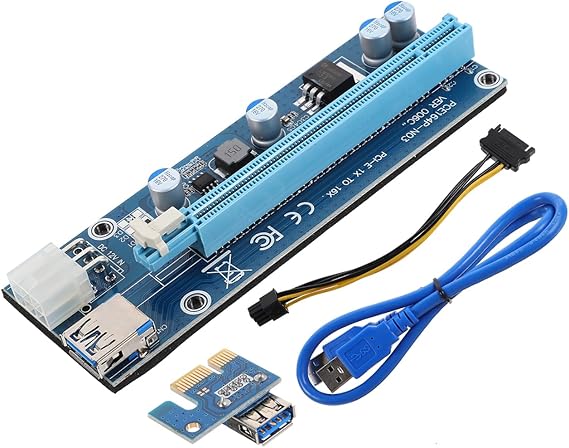


Sản phẩm #:
88660852
-E to Pci-E X16 External Graphics Card Adapter for Laptop
86% of respondents would recommend this to a friend
Sản phẩm #:
88660852
VND 785895
Price Details
Excluding Shipping & Custom charges ( Shipping and custom charges will be calculated on checkout )
*All items will import from Hoa Kỳ
0 ratings
Viết đánh giá
Trong kho
 Đã nhập từ cửa hàng USA
Đặt hàng ngay bây giờ và nhận hàng vào khoảng Thứ Sáu, Tháng 10 02
Secured transaction
Ubuy works hard to protect your security and privacy. Our advanced payment security system ensures confidentiality by encrypting your information during transmission using AES (Advanced Encryption Standards) and SSL (Secure Socket Layer) protocols. Your payment details are 100% secure as we do not share your payment details with third party sellers.
Our Top Logistics Partners


Upgrade your laptop's gaming and multimedia capabilities with the Mini Graphics Card.

Fast
Shipping

Free
Return*

Secure Packaging

100% Original Products

PCI DSS Compliance

ISO 27001 Certified



Note: Step Down Voltage Transformer required for using electronics products of Hoa Kỳ store (110-120). Recommended power converters Mua ngay.


What Stands Out
Enhanced Graphics Performance
Significantly boost your laptop's graphics capabilities with this external GPU, perfect for gaming, video editing, and graphic design.
Plug-and-Play Compatibility
Easily connect the external graphics card to your laptop without complex installations, making it user-friendly for all experience levels.
Versatile Connectivity
Provides multiple connection options for different devices, ensuring maximum flexibility in use and compatibility with various laptops.
Thông tin chi tiết sản phẩm
| Brand | MOLUCKFU |
| Model Number | IDZU3AW5486G148JH |
| Number of Items | 1 |
| Number of Packs | 1 |
| Manufacturer | MOLUCKFU |
| Item Type Name | electronicdevicedockingstation |
| Mfr Part Number | IDZU3AW5486G148JH |
| Hardware Interface | PCI Express 3.0 |
| Compatible Devices | Laptop, Personal Computer |
| Operating System | Windows, macOS |
| Item Dimensions L x W x H | 5.04"L x 1"W x 0.79"H (12.8 x 2.5 x 2 cm) |
| Item Weight | 4 ounces (113.4 grams) |
| Style Name | Classic |
| Product Dimensions (L x W x H) | 5.04"L x 1"W x 0.79"H (12.8 x 2.5 x 2 cm) |
| Style | Classic |
Who Should Buy?

-
Gaming Enthusiasts
Gamers looking for enhanced graphics performance without upgrading their entire laptop will greatly benefit from this product.
-
Creative Professionals
Graphic designers and video editors requiring powerful rendering capabilities can significantly improve efficiency with this external GPU.
-
Frequent Travelers
Users who need a portable solution for graphics-heavy tasks can appreciate the convenience of an external graphics card.

-
Casual Users
Individuals who utilize their laptops for basic tasks like browsing or document editing may find this product unnecessary.
MÔ TẢ SẢN PHẨM
-E to Pci-E X16 External Graphics Card Adapter for Laptop
Có thắc mắc? Trò chuyện với chúng tôi
Câu hỏi và trả lời của khách hàng
-
câu hỏi:
What is an external GPU for a laptop?
trả lời: An external GPU (eGPU) is a device that allows you to enhance your laptop's graphics processing power by connecting an external graphics card through a port like USB or Thunderbolt. This technology is particularly beneficial for gamers or visual professionals who require superior rendering capabilities. eGPUs help laptops handle more demanding applications and games, significantly improving frame rates and overall performance. They are especially useful for multimedia tasks, 3D modeling, and video editing, making your laptop a versatile platform for high-performance tasks. -
câu hỏi:
How do I connect an external GPU to my laptop?
trả lời: Connecting an external GPU to your laptop typically involves using a USB cable or a Thunderbolt port. First, ensure that your laptop's OS supports eGPU connectivity. After plugging in the eGPU, you might need to install specific drivers or software to recognize the external graphics card. Once set up, restart your laptop to enable the eGPU. This setup allows you to leverage the power of a dedicated graphics card while using your laptop for gaming or multimedia applications, unlocking advanced graphics performance for your favorite titles or software. -
câu hỏi:
What are the benefits of using an external GPU for gaming?
trả lời: Using an external GPU for gaming significantly enhances your laptop's graphical capabilities, providing smoother visuals and higher frame rates. This is especially important for demanding games that require robust hardware. An eGPU not only enables you to play the latest titles at better settings but also extends your laptop's lifespan by allowing you to upgrade your graphics hardware over time. With the eGPU, you can achieve desktop-level performance on a portable device, ideal for gamers on the go who don't want to compromise on visual quality. -
câu hỏi:
Can I use an external GPU for tasks other than gaming?
trả lời: Yes, external GPUs are versatile and can be used for various applications beyond gaming. They significantly enhance graphic-intensive tasks like video editing, 3D rendering, and graphic design, providing faster processing and rendering speeds. This means professionals in creative fields can achieve more efficient workflows and improved performance when using software such as Adobe Premiere Pro, AutoCAD, or Blender. Using an eGPU can also improve multitasking by offloading graphic processing from the CPU, ensuring a smoother overall computing experience. -
câu hỏi:
What laptops are compatible with external GPUs?
trả lời: Most modern laptops with USB-C or Thunderbolt ports are compatible with external GPUs. Before purchasing, it is crucial to check if your laptop supports eGPU connectivity through its specifications or user manual. Some gaming and high-performance laptops are designed with eGPU support in mind, allowing for significant upgrades in graphics capabilities. For users seeking to maximize graphics performance, ensure that your laptop can adequately handle the power requirements of the external GPU you choose. -
câu hỏi:
Does an external GPU work with all USB connections?
trả lời: No, not all USB connections are suitable for external GPUs. While USB-C and Thunderbolt 3 or 4 ports can effectively support eGPUs, traditional USB-A ports do not have sufficient bandwidth for the high data transfer rates required for gaming or heavy graphical tasks. It's essential to verify that your laptop has the appropriate port and supports the required protocols to take advantage of the enhanced performance an external GPU provides. -
câu hỏi:
What specifications should I look for in an external GPU?
trả lời: When selecting an external GPU, consider several specifications that can impact performance, including the GPU model, memory size (VRAM), and compatibility with your laptop's connection type. A high-end model with dedicated VRAM will offer better performance for gaming and graphic-intensive tasks. Additionally, check the power requirements and whether the eGPU comes with its own power supply. Ensure it has good cooling solutions to maintain performance during intensive use. These considerations will help you choose an eGPU that meets your gaming or professional needs. -
câu hỏi:
Can I use multiple external GPUs with my laptop?
trả lời: Typically, most laptops support only a single external GPU connection due to bandwidth limitations of the ports. However, some advanced systems and setups allow for multi-GPU configurations, though they require specific hardware and driver support. This is ideal for users seeking to maximize graphics performance for specialized applications like deep learning or high-end gaming. Always check compatibility with your laptop's technical specifications and the eGPU system requirements before attempting to set up multiple external GPUs. -
câu hỏi:
How does an external GPU impact battery life?
trả lời: Using an external GPU can lead to increased power consumption, meaning it may impact your laptop's battery life when not plugged in. The dedicated graphics card in the eGPU requires more energy than built-in graphics solutions. While connected to a power source, the eGPU will enhance performance significantly, but on battery power, you may experience shorter usage times. If you're frequently utilizing high-performance tasks while on the go, consider investing in a robust battery or using your laptop plugged in for optimal performance. -
câu hỏi:
Where can I buy an External GPU for Laptop Adapter Card with USB Cable Enhance Graphics Power Expandability for Gaming and Multimedia?
trả lời: You can buy an External GPU for Laptop Adapter Card with USB Cable on Ubuy. This platform offers a variety of options suitable for enhancing laptop graphic capabilities. With Ubuy, you can explore different brands and specifications, ensuring you find the right eGPU that aligns with your gaming and multimedia needs specifically in Vietnam.
MOLUCKFU Graphics Cards IDZU3AW5486G148JH Editorial Review
Graphics Card Adapter Cable Pcie 3.0 Riser Card External Gpu Extension for Laptop Gaming Multimedia Upgrade with USB Cable is a versatile solution for enhancing your laptop's gaming and multimedia capabilities. This adapter, designed by MOLUCKFU, supports PCI Express 3.0, making it compatible with various devices and operating systems like Windows and macOS. Its compact design, measuring 5.04 x 1 x 0.79 inches and weighing just 4 ounces, allows for easy integration into your setup without taking up much space. Users appreciate its ability to boost graphics performance, providing a seamless gaming experience without sacrificing portability.
Customer Reviews & Ratings
1 điểm của khách hàng
-
5 sao
100%
-
4 sao
0%
-
3 sao
0%
-
2 sao
0%
-
1 sao
0%
Đánh giá sản phẩm này
Chia sẻ suy nghĩ của bạn với các khách hàng khác
ưu
- Compatible with Windows and macOS systems
- Compact and lightweight design
- Easy to integrate into existing setups
- Enhances gaming and multimedia performance
- Supports PCI Express 3.0 for greater compatibility
Nhược điểm
- Limited compatibility with certain devices like iPhone
Platform Trust & Buyer Confidence

JK
Jasmin
Verified buyer
“Great products and very good service: very easy and very fast international delivery.”
9 September 2026 · via Trustpilot
AG
Anke
Verified buyer
“Wonderful online shopping experience, smooth transaction from the start. Payment method works conveniently and delivery is unexpectedly fast and reliable. You go the extra mile for service. What makes this even more amazing, you deliver to Namibia. I will remain a happy Ubuy customer and will increase my purchases for sure! Thank you!”
10 September 2026 · via Trustpilot
H
Hazel
Verified buyer
“Very easy to find the products what you need, and so fast delivery, that’s why I highly recommended to others costumers to used ubuy.”
10 September 2026 · via Trustpilot
O
Opaleye
Verified buyer
“I received exactly what I ordered I was skeptical about your site because that was my first time to order. But the order came timely and neatly packaged. I was not disappointed. Thank you.”
11 September 2026 · via Trustpilot
AC
Adele
Verified buyer
“Easy to find and order what you want on the website. Delivery is quick to the UK”
8 September 2026 · via Trustpilot
Thanh toán An toàn
Global Delivery
Easy Returns
Genuine Products
Product Price History
Thông tin quan trọng
- Hạn chế: Đối với các sản phẩm được vận chuyển quốc tế, xin lưu ý rằng bất kỳ chính sách bảo hành nào của nhà sản xuất có thể không còn hiệu lực; các tùy chọn dịch vụ của nhà sản xuất có thể không khả dụng; hướng dẫn sử dụng sản phẩm, hướng dẫn và cảnh báo an toàn có thể không có bằng ngôn ngữ của quốc gia đến; các sản phẩm (và các tài liệu đi kèm) có thể không được thiết kế theo các tiêu chuẩn, thông số kỹ thuật và các yêu cầu ghi nhãn của quốc gia đến; và các sản phẩm có thể không phù hợp với điện áp của quốc gia đến cũng như các tiêu chuẩn khác về điện (cần phái sử dụng đầu nối hoặc bộ chuyển đổi nếu thích hợp). Người nhận có trách nhiệm đảm bảo rằng sản phẩm có thể được nhập khẩu hợp pháp đến quốc gia đến. Khi đặt hàng từ Ubuy hoặc các chi nhánh của Ubuy, người nhận là nhà nhập khẩu trong hồ sơ, đồng thời phải tuân thủ tất cả các luật cũng như quy định của quốc gia đến.
- Không phải tất cả các sản phẩm được liệt kê trên Ubuy đều được rao bán, vì Ubuy là một công cụ tìm kiếm toàn cầu. Sản phẩm phải tuân theo các quy định về xuất khẩu/thương mại.
VND 785895
Đặt hàng ngay bây giờ và nhận hàng vào khoảng Thứ Sáu, Tháng 10 02
This item is not restrict in my country.(Please click on above link if this item is not restrict in your country, So our team will review and allow.)
QTY:
Secured transaction
PCI DSS compliant and ISO 27001:2022 certified, with encrypted payments and full buyer protection on every order.
Our Top Logistics Partners
Fastest cross-border delivery
Các tính năng và lợi ích
- Elevates gaming and multimedia experience on laptops.
- Quick and easy connection to external monitors and peripherals.
- Convenient solution for expanding laptop capabilities.
- Enhances graphics processing power for improved performance.
- Ideal for gamers and multimedia enthusiasts.
- Seamless and immersive visual effects for enhanced experience.
Ubuy Assurance
Experience worry-free shopping with 100% original products, PCI DSS-compliant payment security, ISO 27001-certified data protection, the fastest cross-border delivery, free returns *, and secure packaging on every order.